AWS Maintenance Mode for Controlled Production Operations
Build AWS maintenance mode that reduces operational risk and stays available when the application is offline, using CloudFront, ECS, ALB, S3, and GitHub Actions.

A reliable maintenance strategy should reduce operational risk, not introduce new dependencies when a system is most vulnerable.
That means maintenance controls should remain available even when the application is offline and be activated without unnecessary infrastructure changes.
In this blog, we show how we applied this principle through an AWS maintenance mode for a production client platform that can be switched on within seconds while remaining independent of the application. In practice, maintenance mode can be switched on in around 5 seconds, with the full automated process completing in about 20 seconds, without backend changes or product redeployment.
Maintenance Mode Should Be Independent of the Application
Maintenance often coincides with highly sensitive changes to a production system, from database upgrades and infrastructure changes to major releases.
In this Research Hub Application, multiple applications can share the broader AWS environment, but maintenance may only be required for one of them at a time. The requirement was therefore to activate AWS maintenance mode for a specific application within seconds, without affecting the others, while keeping the maintenance experience available even when that application's containers were offline.
We designed the maintenance path around three principles:
-
Independence: The maintenance page should remain available even when the target application's ECS services are offline.
-
Scoped activation: Operators should be able to enable or disable maintenance for one application without changing DNS, redeploying application code, or affecting other applications on the platform.
-
Controlled access: Runtime changes should use an authenticated and auditable production workflow rather than manual infrastructure changes.
Architecture and Request Flow
Amazon Route 53 directs research-app.example.com to Research Hub Application’s CloudFront distribution. CloudFront is the public entry point and connects to two origins: the ALB for application traffic and a private S3 bucket for the static maintenance page.
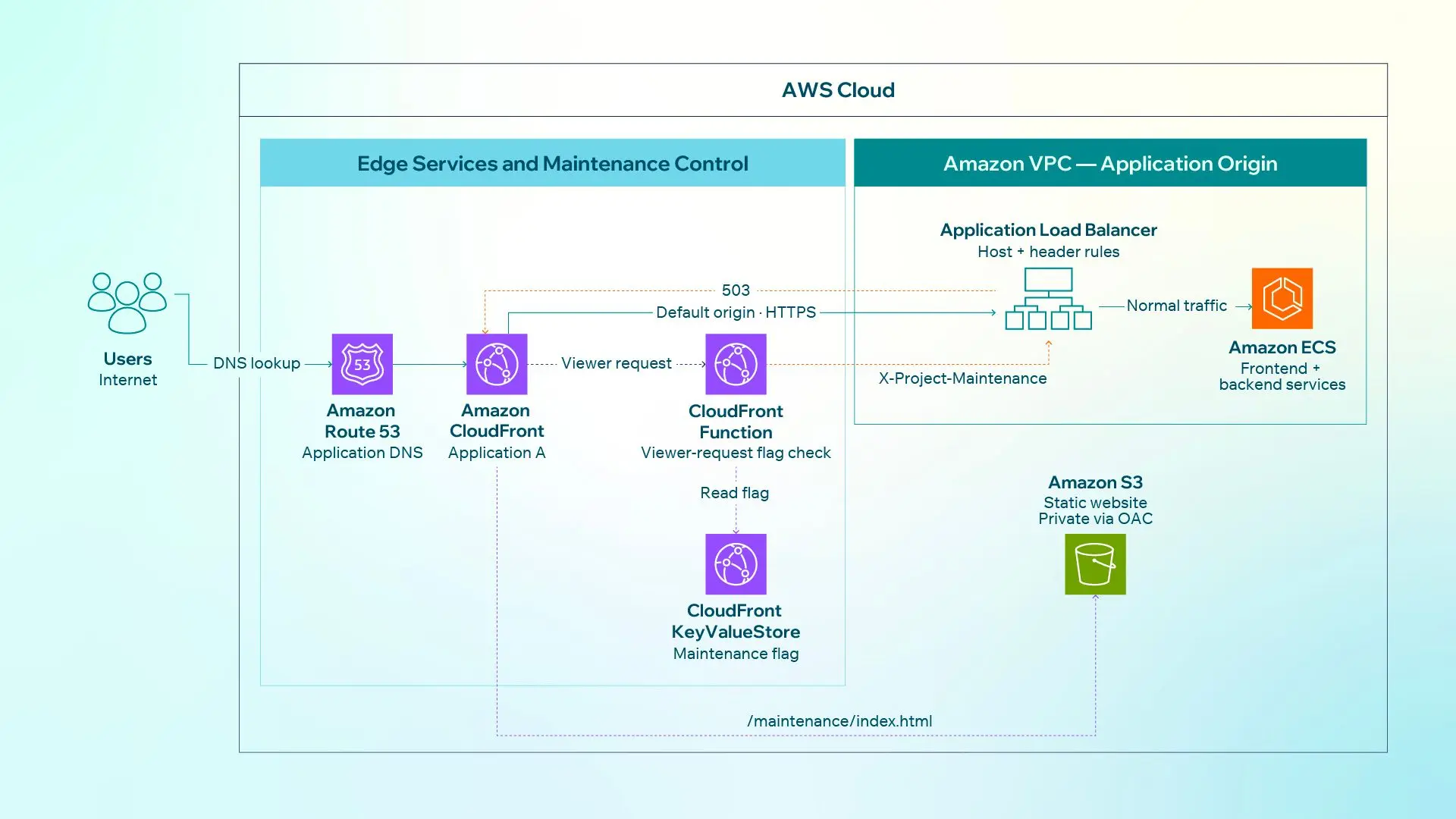
Figure 1. Normal and maintenance traffic paths for Research Hub Application
A CloudFront Function runs on every viewer request and reads this flag from CloudFront KeyValueStore:
research-app = true | false
During normal operation, the flag is false, so AWS maintenance mode remains inactive. CloudFront forwards the HTTPS request to the ALB, which routes it to the frontend and backend services running on Amazon ECS.
If the KeyValueStore cannot be read, the function fails open and allows the request to continue normally. This prevents an issue with the maintenance control mechanism itself from unnecessarily taking the application offline.
When maintenance is enabled, the function removes any maintenance header supplied by the viewer and adds its own trusted header:
X-Project-Maintenance:research-app
A high-priority ALB listener rule matches both research-app.example.com and this header. Instead of forwarding the request to Amazon ECS, the ALB returns 503 Service Unavailable.
CloudFront then applies its custom error response and serves the maintenance page from Amazon S3 while preserving the 503 status.
User -> Route 53 -> CloudFront -> ALB -> Amazon ECS

Maintenance:
User -> Route 53 -> CloudFront -> ALB returns 503
     -> CloudFront custom error response -> Amazon S3 maintenance page
The application's public endpoint stays unchanged. Traffic is handled differently behind CloudFront.
Why Preserve the 503 Response?
A maintenance page can appear correct to a user while still communicating the wrong system state.
If the page returns 200 OK, automated clients may interpret the response as a successfully operating application. Returning 503 Service Unavailable instead explicitly communicates that the service is temporarily unavailable.
Monitoring systems, API consumers, crawlers, and other automated clients can continue to interpret application availability correctly rather than treating the maintenance page as a normal application response.
Serving the Maintenance Page Securely
The maintenance page is a small, self-contained HTML file stored as maintenance/index.html in a private S3 bucket.
Terraform uploads it with the text/html content type and Cache-Control: no-store, no-cache, must-revalidate, helping prevent users from seeing a stale maintenance page after maintenance ends.
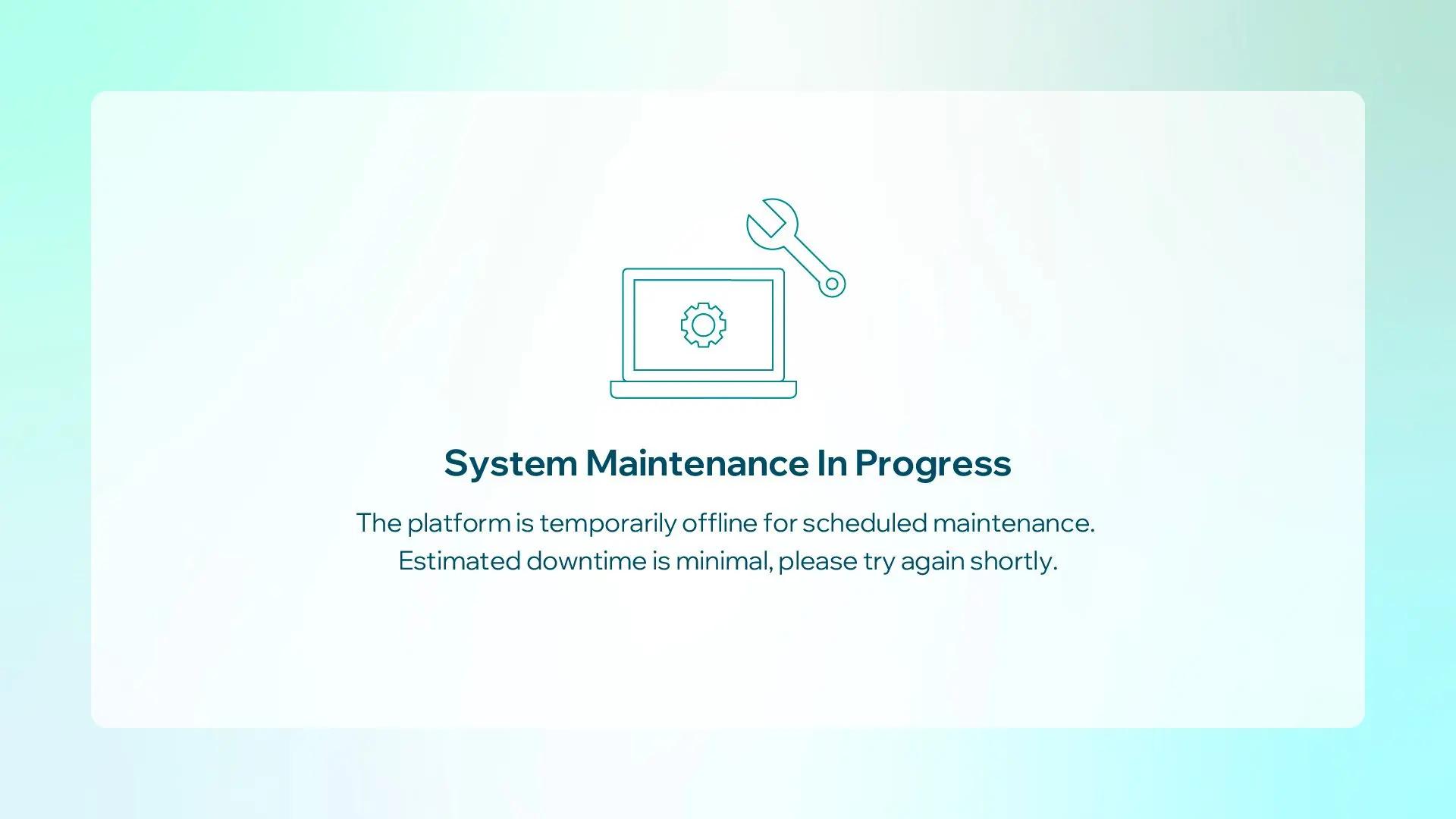
Figure 2. The static maintenance page delivered through CloudFront
CloudFront registers the bucket as a second origin and routes /maintenance/\* to it. Origin Access Control (OAC) signs each request with SigV4, and the bucket policy permits s3:GetObject only from Research Hub Application’s CloudFront distribution.
Although the page contains static web content, we do not expose an S3 website endpoint. CloudFront accesses the bucket's regional S3 endpoint through OAC, allowing S3 Block Public Access to remain enabled and preventing users from bypassing CloudFront.
The full delivery process:
-
Terraform uploads
maintenance/index.htmlto the private S3 bucket. -
The ALB returns
503when the trusted maintenance header is present. -
CloudFront maps that response to
/maintenance/index.html. -
CloudFront securely retrieves the file from S3 and returns it with status
503.
Keeping the Fallback Path Simple
The maintenance path intentionally contains very little application logic.
Maintenance windows often coincide with changes to the application's most important dependencies. If the fallback mechanism relies on those same dependencies, both can fail together.
A static HTML file in S3 gives the maintenance experience a much smaller dependency surface than the application stack. CloudFront remains responsible for public delivery while the ECS application can be stopped, replaced, or upgraded independently.
Operating AWS Maintenance Mode Through CI/CD
Terraform provisions the CloudFront distribution, function, KeyValueStore, ALB rule, S3 bucket, OAC policy, and maintenance page. It creates the research-app flag with an initial value of false.
An authorized operator uses the manually triggered GitHub Actions workflow, \[Prod\] Toggle Maintenance Mode, to enable or disable maintenance mode.
The workflow runs through the protected PROD environment and uses GitHub OIDC to assume a scoped AWS IAM role, avoiding long-lived AWS credentials in GitHub.
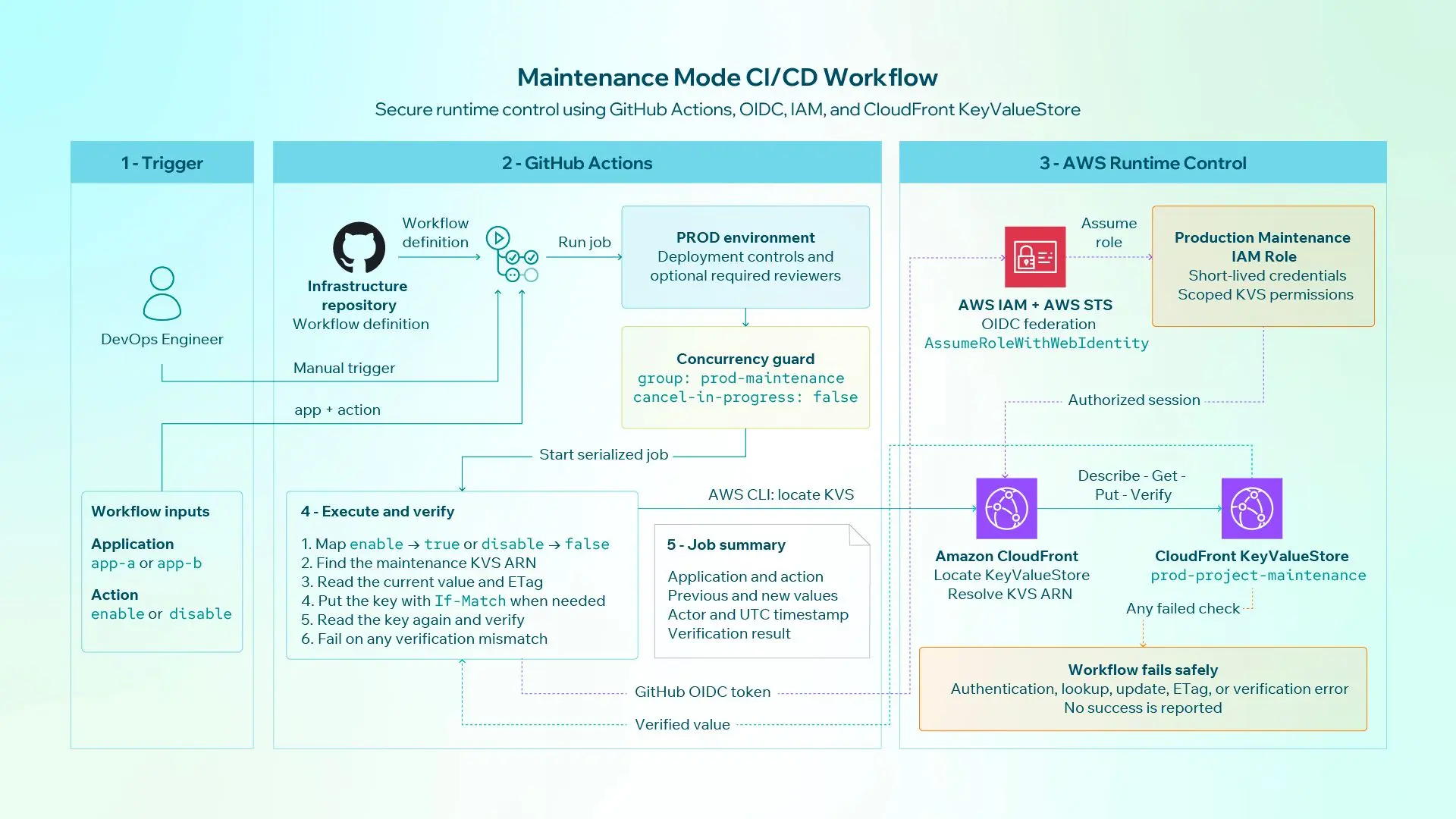
Figure 3. Secure runtime control of Research Hub Application maintenance flag
The workflow reads the current KeyValueStore value and ETag, converts the requested action into true or false, updates the research-app key with concurrency protection, and verifies the result.
Its job summary records:
-
Operator
-
Previous value
-
New value
-
Verification result
-
UTC timestamp
Workflow concurrency prevents simultaneous production changes.
Terraform ignores later runtime updates to the flag, so Terraform remains responsible for the infrastructure while the approved workflow manages the operational state.
Separating Infrastructure From Operational State
Terraform defines the maintenance capability itself: routing, permissions, storage, CloudFront behavior, and the initial configuration.
GitHub Actions controls whether that capability is currently active.
Operators do not need to run an infrastructure deployment simply to change the application's operational state. At the same time, future Terraform runs do not overwrite an approved runtime decision.
Terraform

    -> Infrastructure configuration


GitHub Actions

    -> Approved operational state change


CloudFront KeyValueStore

    -> Current maintenance state
What this Design Changes Operationally
The architecture reduces the number of systems that need to change when AWS maintenance mode is activated, while giving the team a fast and repeatable way to control planned downtime.
-
Maintenance can be activated in seconds: The maintenance flag switches in around 5 seconds, while the full automated workflow completes in about 20 seconds.
-
No backend change is required: Maintenance mode operates independently from the application, so teams do not need to modify backend logic just to take the system offline.
-
No application deployment is required: Maintenance mode is controlled separately from the product release process, avoiding unnecessary redeployment during a maintenance window.
-
No DNS change is required: The application's hostname and CloudFront distribution remain unchanged.
-
The maintenance experience remains separate from ECS: The static page can continue to be delivered while application containers are stopped, replaced, or upgraded.
-
Runtime changes are controlled and auditable: GitHub Actions provides a defined workflow rather than relying on ad hoc console operations.
-
Clients receive the correct service state: The maintenance page preserves
503 Service Unavailableinstead of presenting downtime as a successful request.
Because the approach reuses the client's existing AWS infrastructure and does not require a separate maintenance application, it also adds little additional infrastructure overhead while keeping the maintenance path independent from the production application.
The Broader Architectural Principle
Maintenance mode illustrates a broader principle for production systems: operational controls should not depend unnecessarily on the systems they are designed to control.
For Research Hub Application, separating the maintenance path from the application means maintenance can be activated within seconds without changing DNS or deploying application code, while users and automated clients still receive the correct 503 response.
The result is a more predictable and auditable maintenance process with fewer dependencies during sensitive production changes.
If your team is working through similar AWS architecture or operational resilience challenges, get in touch with CodeLink to discuss the approach.
Giang Le
DevOps Engineer
Giang Le is a DevOps Engineer with a speciality in cloud computing and web application operations, specializing in Microsoft Azure and familiar with AWS. He has hands-on expertise in automating deployments and managing scalable infrastructure using Docker, Kubernetes, and Infrastructure as Code tools such as Terraform and Pulumi (TypeScript).